
The WordPress plugin is not working correctly, or you want to reinstall it without losing data or removing the plugin.
You can do this with both active and inactive plugins.
- Log in to the WordPress dashboard.
- From the Dashboard menu, go to Plugins and click Plugin File Editor.

- From the Select plugin to edit drop-down menu, choose the plugin and click Select.

- In the file editor, locate the version line:
Version: 1.7.2
Change it to:Version: 1.7.1
Only change the version from a higher to a lower number.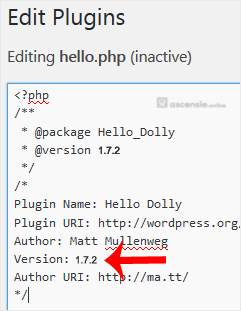
- Scroll down and click Update File. Then go back to the Installed Plugins list. There should be an update for the plugin you edited. Click Update now.
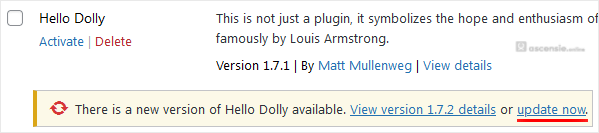
You have forcefully updated/reinstalled the plugin without losing data.




Add Comment